Audi Radio Codes — Instant & Guaranteed
Lost your radio code after a battery change? Get the exact unlock code for your Audi, VW, SEAT or Skoda radio — Concert, Symphony, RCD 510, RNS 510 and more. Delivered by email from £18.95 with our 24-hour guaranteed online service.
Get your Audi radio code in 3 easy steps
Recover your Audi radio code in under 2 minutes — no technical knowledge needed.
FIND YOUR SERIAL
Locate the 14-digit serial number on your radio unit. Remove the radio or check the sticker on the side — takes 2 minutes.
PAY SECURELY
Enter your serial number and email. Pay securely with card or Apple Pay via Stripe. Takes under 30 seconds.
RADIO UNLOCKED
Receive your unlock code instantly by email. Enter it using the radio preset buttons. Your radio is working again.
How to find your radio serial number
We provide radio codes for all VW Group radios — Audi, VW, SEAT and Skoda. Follow the steps below to locate your serial number, then enter it on our order page.
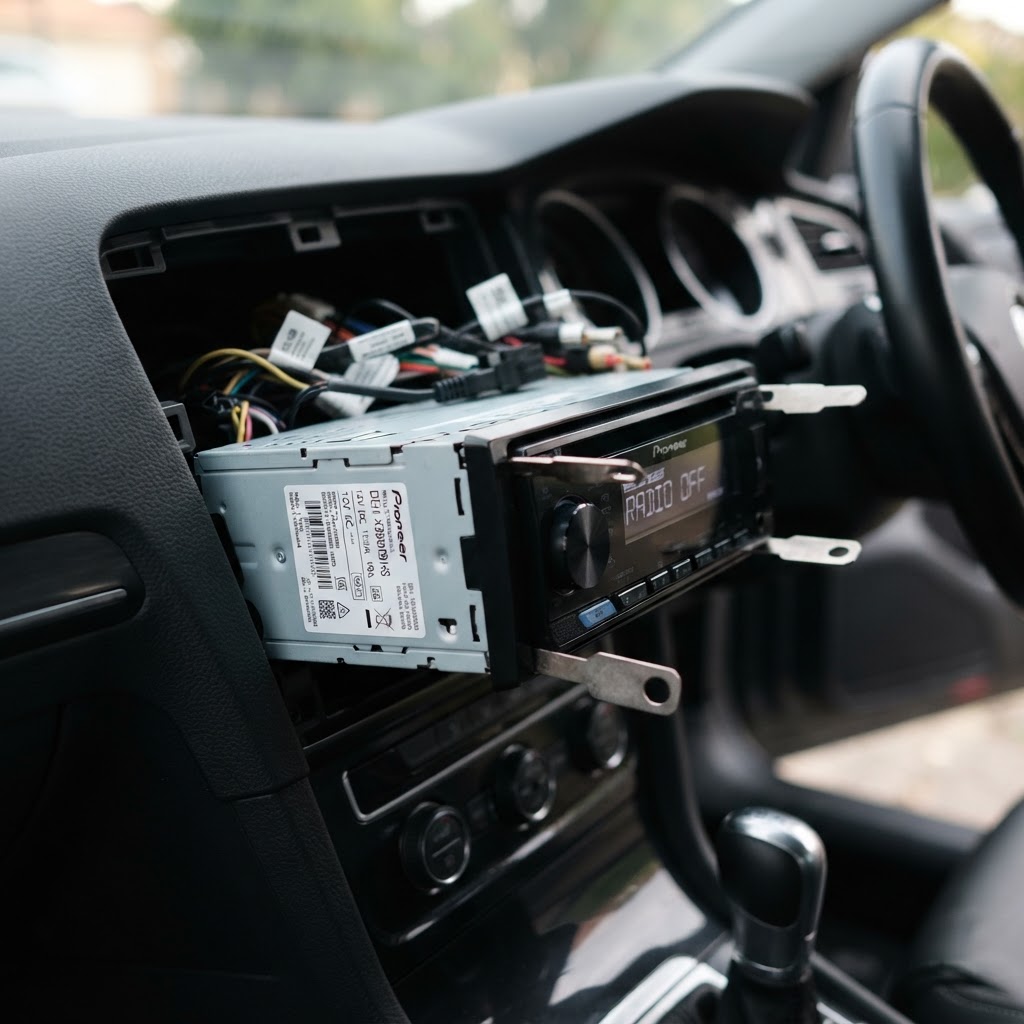
Remove your radio
Insert radio release keys into the corner slots of the fascia and slide the unit forward. You do not need to disconnect any wires — just slide it far enough to read the label on the side or back of the casing.
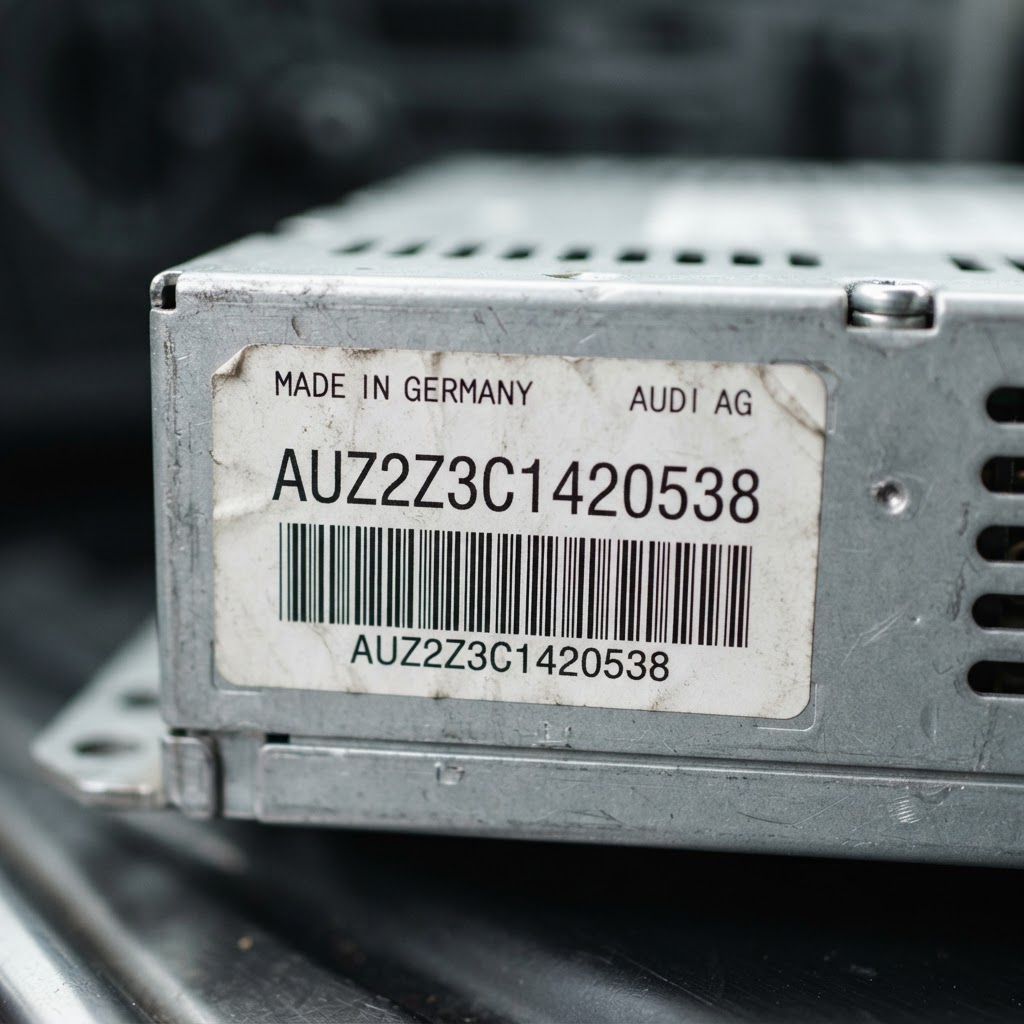
Find your serial number
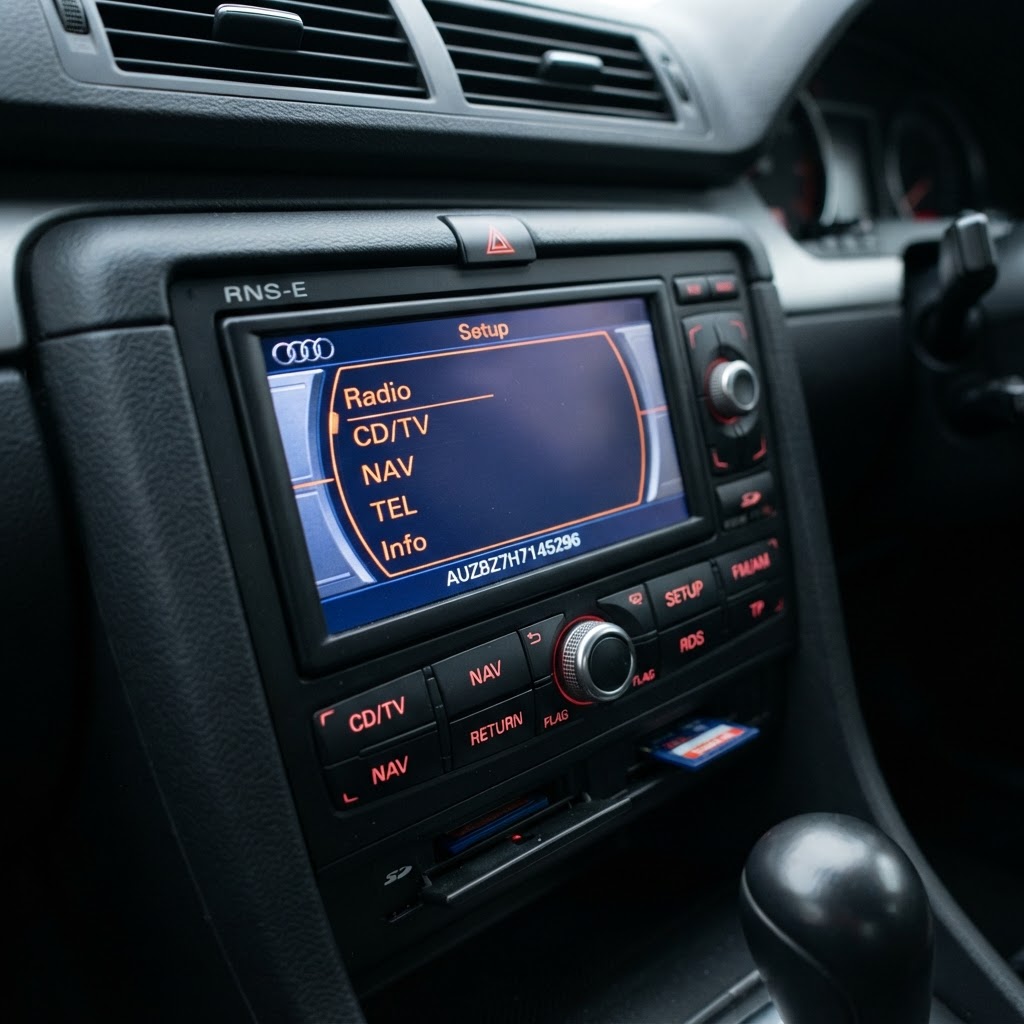
Look for a white sticker on the side or rear of the unit. The serial is 14 characters long and starts with a brand prefix (AUZ, VWZ, SEZ or SKZ). For Audi RNS-E, the serial appears on screen — no removal needed.
Enter serial & pay securely
Type your serial into our order page, enter your email, and complete checkout via Stripe. Your unlock code is delivered by email, usually within minutes.
What your serial looks like
Every VW Group radio serial is 14 characters long and starts with a brand prefix. Check which prefix yours begins with:
Chorus, Concert, Symphony, RNS-E (6th char = 7), MMI, Delta, Beta, Gamma
RCD 200/300/310 (VWZ1Z), RCD 500/510 (VWZ4Z), RNS 510 (VWZ6Z), RNS 310/315 (VWZ7Z)
Aura, Alana, Radio 300–510, Media System, Navigation (6th char = 7)
Bolero, Swing, Dance, Blues, Stream, Amundsen, Columbus (6th char = 7)
Who makes your radio?
VW Group radios were made by several manufacturers — Blaupunkt, Delphi, Technisat and Bosch. The manufacturer name is printed on the serial label, but the serial prefix (AUZ, VWZ, SEZ, SKZ) always identifies the car brand, not the manufacturer.
Blaupunkt
Primary VAG radio supplier
Made most Audi Chorus, Concert, Symphony, Delta, Beta and Gamma units, plus VW RCD 200/300/310/500 and many SEAT and Skoda radios. Serials on a white Blaupunkt label on the casing.
Delphi
VW & SEAT supplier
Manufactured the VW RCD 210/215 and RCD 510, plus some SEAT Media System units. Look for the Delphi branding on the serial label — serials still use the VWZ or SEZ prefix.
Technisat
Navigation unit specialist
Built the VW RNS 310/315/510, Discover Media and Pro, plus Skoda Amundsen and Columbus navigation units. Serial label is on the rear of the unit after partial removal.
Bosch
VW radio supplier
Produced some VW radio units. The VWZ serial is on a Bosch label and often also stamped into the metal casing above the label.
Important things to know
What does SAFE mean?
SAFE is the factory anti-theft lock mode. It appears when the radio loses power — after a flat battery, battery change, or service. The radio will not play until the correct code is entered.
SAFE but can't enter a code?
Some models lock you out after failed attempts. Leave the ignition and radio switched on for about one hour. Do not keep switching it on and off — the timer resets each time. After an hour, code entry becomes available again.
Can I use my VIN number?
No. VW Group radio codes are linked to the radio serial number, not the vehicle VIN. You must remove the radio and read the serial from the label on the unit (or from the screen on RNS-E).
Do I need to disconnect wires?
No. You only need to slide the radio forward far enough to read the serial label. There is no need to disconnect any wiring. Once you have the serial, slide the unit back in.
Common mistakes to avoid
The capital letter I and the number 1 look identical on radio labels — check carefully before entering.
The letter O and the number 0 are easily confused — VW Group serials always use zero, not the letter O.
All VW Group serials are exactly 14 characters long — if yours is shorter, you may be reading a part number instead.
For Audi RNS-E, the 6th character of the serial is always the number 7 — if yours differs, double-check the screen.
Double-check your serial before paying — if you enter the wrong one, the generated code will not work.
Model-specific guide
Full VAG group coverage — Audi, VW, SEAT & Skoda. Find your radio model for detailed removal instructions and serial examples.
Audi Chorus 2 / 3
A2, A3 8L, A4 B5/B6
BlaupunktSingle-DIN cassette/CD unit. Use Audi T-bar removal keys to slide the unit out. Serial on the top or side chassis label.
Tip: Serial starts with AUZ. Example: AUZ2Z3C1420538
Audi Concert 2 / 3
A1, A2, A3 8L/8P, A4 B6/B7, TT 8N, Q2, Q3
BlaupunktSingle-DIN CD unit. Use Audi T-bar removal keys to slide the unit out. Serial on the top or side chassis label.
Tip: Serial starts with AUZ. Example: AUZ1Z2F1193677
Audi Symphony 2 / 3
A1, A4 B6–B8, A5, A6 C5–C7, A8 D3, Q2, Q3, Q5, R8
BlaupunktDouble-DIN CD/radio unit. Insert four release keys into the corner holes and slide forward. Serial on the rear label.
Tip: Serial starts with AUZ. Example: AUZ1Z4H7755256
Audi BNS 5.0 / 5.1
A3 8P, A4 B7, TT 8J
BlaupunktNavigation CD unit. Insert release keys and slide forward. Serial on the rear chassis label.
Tip: Serial starts with AUZ. Example: AUZBZ7H7145296
Audi RNS-E Navigation
A3 8P, A4 B7, A6 C6, TT 8J
BlaupunktNavigation unit — no removal needed. Power on and read the serial from the bottom edge of the display screen.
Tip: Serial starts with AUZ, 6th character is always 7. Example: AUZBZ7H7145296
Audi RNS-D Navigation
A4 B5/B6, A6 C5, A8 D2
TechnisatOlder CD-based navigation. Insert release keys and slide forward. Serial on the rear label.
Tip: Serial starts with AUZ. Example: AUZ1Z4H7755256
Audi MMI 2G / 3G / 3G+
A1, A3 8V, A4 B8, A5, A6 C6/C7, A7, A8 D4, Q2, Q3, Q5, Q7, Q8, R8, e-tron
Harman / BeckerIntegrated MMI system. Access via MMI Settings → System Information, or read the label after partially removing the head unit.
Tip: Serial starts with AUZ. Some MMI units use a different decode method.
Audi Delta / Beta / Gamma
A3 8L, A4 B5/B6, A6 C4
BlaupunktOlder cassette/CD units. Use Audi release keys to slide the unit out. Serial on the top or side label.
Tip: Serial starts with AUZ. Example: AUZ2Z3C1420538
VW RCD 200
Polo 9N, Fox, Lupo, Golf Mk4, Caddy, Transporter T4/T5
BlaupunktBasic CD/radio unit. Pry off trim and use release keys to slide out. Serial on the side or rear label.
Tip: Serial starts with VWZ. Example: VWZ1Z1L1234567
VW RCD 210 / 215
Polo 6R, Fox, Caddy, up!, Mii
DelphiBasic CD/radio units. Pry off plastic trim, remove 4 screws and slide out to find the serial label.
Tip: Serial starts with VWZ5Z. Example: VWZ5Z1L0285159
VW RCD 300
Golf Mk4/Mk5, Passat B5/B6, Touran, Caddy, Sharan, CC, Scirocco, Crafter, Eos
BlaupunktCD/radio unit. Pry off trim, use release keys to slide the unit out. Serial on the side or rear label.
Tip: Serial starts with VWZ1Z. Example: VWZ1Z2H1234567
VW RCD 310
Golf Mk5/Mk6, Passat B6, Tiguan, Touran, Caddy, Sharan, CC, Scirocco, Crafter, Eos
BlaupunktCD/radio with MP3. Pry off trim, use release keys to slide the unit out. Serial on the side or rear label.
Tip: Serial starts with VWZ1Z. Example: VWZ1Z2H1234567
VW RCD 500
Golf Mk4/Mk5, Passat B5, Touran, Touareg
BlaupunktOlder double-DIN CD/radio. Use four removal keys to partly remove the unit. Serial on the rear label.
Tip: Serial starts with VWZ4Z. Example: VWZ4Z3K6321212
VW RCD 510
Golf Mk6, Passat B6/B7, Tiguan, Sharan, Phaeton, Eos, CC, Scirocco, Amarok
DelphiDouble-DIN CD/radio with colour screen. Use four removal keys to partly remove the unit — serial is on the rear label.
Tip: Serial starts with VWZ4Z. Example: VWZ4Z3K6321212
VW RNS 300
Golf Mk5, Passat B6, Touran
BlaupunktBasic navigation unit. Pry off trim, remove screws, slide forward. Serial on the rear label.
Tip: Serial starts with VWZ. Example: VWZ7Z2F1193677
VW RNS 310 / 315
Golf Mk5/Mk6, Passat B6, Touran, Caddy, Tiguan, Scirocco, CC, Eos, Amarok
TechnisatNavigation units. Pry off plastic trim, remove 4 screws, then slide out to find the serial label.
Tip: Serial starts with VWZ7Z. Example: VWZ7Z2F1193677
VW RNS 510
Golf Mk6, Passat B7, Tiguan, Phaeton, Touareg, Touran, Sharan, Amarok, Scirocco, CC
TechnisatPremium navigation with DVD drive. Use a prying tool and screwdriver to partly remove the unit — serial is on the rear label.
Tip: Serial starts with VWZ6Z. Example: VWZ6Z7G3512834
VW Discover Media / Pro
Golf Mk7/7.5, T-Roc, Tiguan, T6, Arteon, T-Cross
TechnisatTouchscreen navigation. Partially remove the unit to access the serial label on the rear.
Tip: Serial starts with VWZ. Example: VWZ5Z7L0496236
VW Composition Media
Polo 6C, Golf Sportsvan, up!, T-Cross, T6
TechnisatTouchscreen infotainment. Partially remove the unit to access the serial label on the rear.
Tip: Serial starts with VWZ. Example: VWZ5Z1L0285159
VW Beta / Gamma
Golf Mk4, Bora, Polo 9N, Lupo
BlaupunktOlder cassette/CD units. Use radio release keys to pop the unit out — serial is on a label on the unit.
Tip: Serial starts with VWZ. Release keys available online for under £10.
VW Delphi (VWZ4Z)
Golf Mk5/Mk6, Passat B6, Eos
DelphiDelphi-manufactured units with VWZ4Z prefix. Use four removal keys to partly remove — serial on the rear label.
Tip: Serial starts with VWZ4Z. Example: VWZ4Z2K1310391
SEAT Aura
Ibiza 6J/6P, Leon 1P/5F, Altea, Toledo, Cordoba
BlaupunktUse radio release keys or a flat-head screwdriver to remove the trim surround, then slide the unit forward. Serial on the casing label.
Tip: Serial starts with SEZ. Example: SEZ1Z3F6412082
SEAT Alana
Ibiza 6P, Leon 5F, Ateca, Leon ST
BlaupunktRemove the trim surround and slide the unit forward. Serial on the casing label.
Tip: Serial starts with SEZ. Example: SEZ1Z2K4657819
SEAT Radio 300 / 310
Ibiza 6J/6P, Leon 1P, Altea
BlaupunktCD/radio unit. Remove trim surround and slide forward. Serial on the casing label.
Tip: Serial starts with SEZ. Example: SEZ1Z3F6412082
SEAT Radio 500 / 510
Leon 1P, Alhambra, Exeo, Tarraco
BlaupunktDouble-DIN CD/radio. Remove trim surround and slide forward. Serial on the rear label.
Tip: Serial starts with SEZ. Example: SEZAZ2L1958512
SEAT Media System
Ibiza 6P, Leon 5F, Ateca, Arona, Tarraco, Leon ST
DelphiTouchscreen media unit. Remove trim and slide forward to access the serial label.
Tip: Serial starts with SEZ. Example: SEZ1Z2K4657819
SEAT Navigation System
Leon 5F, Ateca, Arona, Tarraco, Leon ST
TechnisatNavigation unit. Remove trim and slide forward to access the serial label on the rear.
Tip: Serial starts with SEZ, 6th char = 7 on nav. Example: SEZ1Z7G1254658
SEAT Leon / Ibiza (SAFE mode)
Leon 1P/5F, Ibiza 6J/6P
BlaupunktRemove the trim surround and slide the unit forward. If SAFE appears but code entry is not possible, leave the radio powered on for one hour.
Tip: Serial starts with SEZ. Example: SEZAZ2L1958512
Skoda Bolero
Fabia Mk2/3, Rapid, Roomster, Octavia Mk2, Scala, Kamiq, Enyaq
BlaupunktUse a flat-head screwdriver to pry off trim, remove 4 screws, slide forward. Serial on the casing label.
Tip: Serial starts with SKZ. Example: SKZAZ5L1562150
Skoda Swing
Fabia Mk1/2, Roomster, Citigo, Yeti, Karoq, Kodiaq, Kamiq
BlaupunktBasic CD/radio. Pry off trim, remove screws, slide forward. Serial on the casing label.
Tip: Serial starts with SKZ. Example: SKZAZ5L1562150
Skoda Dance
Fabia, Citigo, Scala
BlaupunktPry off trim with a flat-head screwdriver, remove screws, slide forward. Serial on the side or top label.
Tip: Serial starts with SKZ. Example: SKZ1Z2K6277612
Skoda Blues
Fabia, Citigo, Rapid
BlaupunktEntry-level radio. Pry off trim, remove screws, slide forward. Serial on the casing label.
Tip: Serial starts with SKZ. Example: SKZ1Z2K6277612
Skoda Stream
Octavia Mk2, Superb Mk2
BlaupunktCD/radio with MP3. Remove trim, unscrew, slide forward. Serial on the rear label.
Tip: Serial starts with SKZ. Example: SKZAZ5L1562150
Skoda Amundsen
Octavia Mk3, Superb Mk3, Kodiaq, Karoq, Yeti, Rapid, Scala, Kamiq, Enyaq
TechnisatNavigation unit. Same removal process as VW equivalents. Serial on the chassis label after sliding the unit out.
Tip: Serial starts with SKZ. Example: SKZ1Z7G1254658
Skoda Columbus
Octavia Mk3, Superb Mk3, Kodiaq, Karoq, Yeti, Enyaq
TechnisatPremium navigation with DVD drive. Remove trim and slide forward. Serial on the rear label.
Tip: Serial starts with SKZ, 6th char = 7 on nav. Example: SKZ1Z7G1254658
Skoda Symphony
Fabia Mk1, Octavia Mk1
BlaupunktOlder CD/radio unit. Use release keys to slide the unit out. Serial on the casing label.
Tip: Serial starts with SKZ. Example: SKZAZ5L1562150
Not sure which model you have? Contact us and we'll help you locate your serial before you pay a penny.
Radio codes for Audi, VW, SEAT & Skoda
We provide radio unlock codes for the full VW Group range — covering every radio model from 1998 to present day. If your radio is locked after a battery change or repair, we have your code.
Audi
8 modelsVolkswagen
12 modelsSEAT
6 modelsSkoda
8 modelsDon't see your model? Contact us — we cover many additional units not listed here.
The UK's most trusted VW Group radio code service
Thousands of UK drivers use us every day to unlock their Audi, VW, SEAT and Skoda radios — fast, cheap and guaranteed.
GUARANTEED TO WORK
Every code is verified before delivery. If it fails, you get a full refund — no questions asked.
4.9 STAR RATED
Over 2,400 verified reviews from real UK customers. We're the most trusted service online.
24H GUARANTEED
Most codes delivered in minutes. All codes guaranteed within 24 hours or your money back.
UK-BASED SUPPORT
Real humans, 7 days a week. We're based in the UK and know VW Group radios inside out.
STRIPE SECURE
256-bit encrypted payments. We never store your card details. Pay with Apple Pay too.
SAVE UP TO 80%
Dealers charge £60–£100 for the same code. We charge from £18.95. Same result, fraction of the cost.
"Got my Audi A4 code in under a minute. Saved me £80 at the dealer. Brilliant service!"
"Worked first time on my A3. So much cheaper than the Audi dealer. Will definitely use again."
"Couldn't believe how easy it was. Code arrived instantly for my TT. 10/10 recommend."
Need an Audi radio code? Don't pay £60+ at the dealer.
Get the exact same unlock code your dealer charges £60–£100 for — delivered to your inbox from just £18.95 with our 24-hour guaranteed service.